

You use laser cutting when you need to cut materials with a focused laser beam. This process does not touch the material, which keeps the surface clean. You get high accuracy when you choose laser cutting. See the table below to compare how precise laser cutting is compared to saw cutting.
| Aspect | Laser Cutting | Saw Cutting |
|---|---|---|
| Precision | ±0.003 inches | ±0.01 inches |
Laser cutters give you sharp edges and detailed shapes. You can trust this tool for both simple and complex cutting tasks.
Key Takeaways
- Laser cutting is very precise. It can cut as close as ±0.003 inches. This makes it great for projects with lots of detail.
- This technology works on many materials. It can cut metals, plastics, and wood. So, it is used in many industries like cars and airplanes.
- It is important to know how laser cutting works. First, you get the materials ready. Then, a strong laser beam is made. You also set the cutting settings to get the best results.
- Laser cutting saves time and reduces waste. But, you need good training to use it safely. You also need to take care of the machine for it to work well.
- Always make sure the material is right before cutting. Check if it is the right type and thickness. This helps you avoid mistakes and get good results.
What Is Laser Cutting?
Definition and Key Features
Laser cutting uses a strong beam of light to cut or shape things. This beam is very focused and does not touch the material. The laser melts, burns, or turns the material into gas along a set path. This makes the edges smooth and the shapes very detailed.
Some things make laser cutting special:
- You can cut very exact shapes, even if they are hard or small.
- Laser cutting machines often work by themselves, so you can make lots of parts fast.
- The cuts are very thin, which helps you add tiny details to your work.
- The laser never touches the material, so you do not worry about tools wearing out.
- Laser cutting works well with computers, so it fits in modern factories.
- You can get accuracy from about ±0.1 mm to ±0.5 mm, and sometimes as close as ±0.01 mm for thin metals.
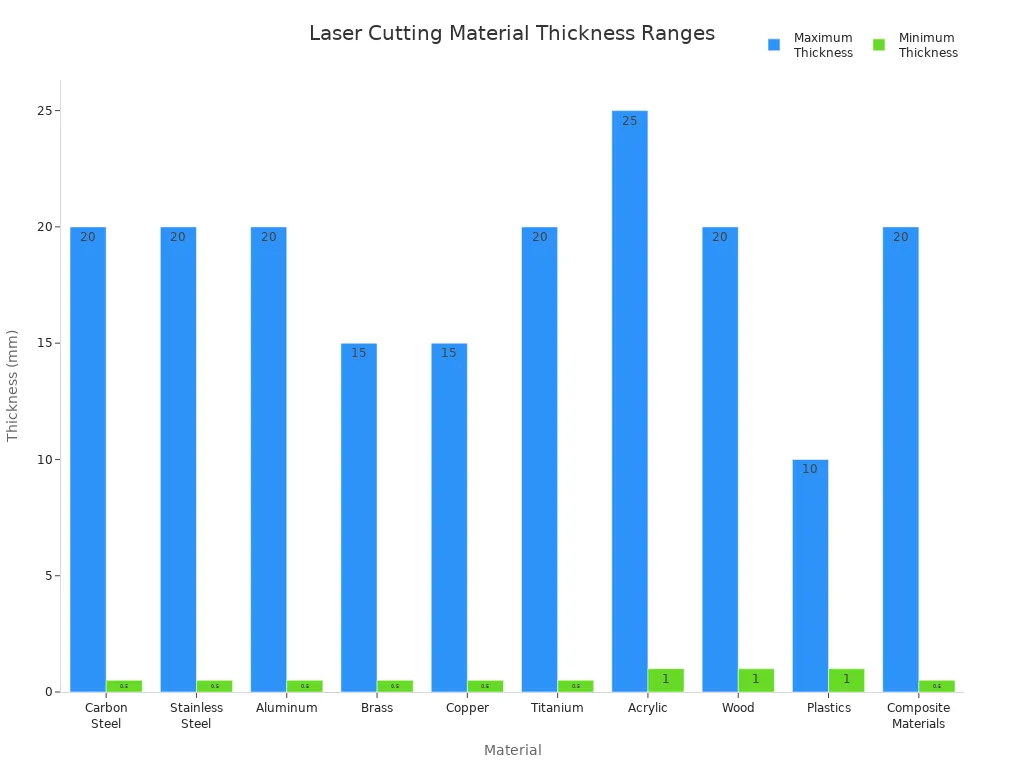
Laser cutting works on many materials. You can check the table below to see how thick or thin each material can be:
| Material | Maximum Thickness | Minimum Thickness |
|---|---|---|
| Carbon Steel | Up to 20 mm | As thin as 0.5 mm |
| Stainless Steel | Up to 20 mm | As thin as 0.5 mm |
| Aluminum | Up to 20 mm | As thin as 0.5 mm |
| Brass | Up to 15 mm | As thin as 0.5 mm |
| Copper | Up to 15 mm | As thin as 0.5 mm |
| Titanium | Up to 20 mm | As thin as 0.5 mm |
| Acrylic | Up to 25 mm | As thin as 1 mm |
| Wood | Up to 20 mm | As thin as 1 mm |
| Plastics | Up to 10 mm | As thin as 1 mm |
| Composite Materials | Up to 20 mm | As thin as 0.5 mm |
Tip: Laser cutting works for thick and thin materials, but always check what your machine can handle.
Industrial and Artistic Uses
Many industries use laser cutting because it is fast, exact, and can do many jobs. Here are some main areas that use laser cutting:
- Automotive: You can cut car parts and panels very accurately.
- Consumer Electronics: You can make small, detailed parts for things like phones and computers.
- Aerospace: You can create strong and light parts for airplanes.
- Other Manufacturing Industries: You can use laser cutting for tools, machines, and special parts.
Laser cutting is also important in art and design. Artists and designers use lasers to make special projects. Here are some ways you can use laser cutting in art:
- You can make sculptures with shapes that are hard to make by hand.
- You can design and cut custom jewelry, adding tiny patterns to acrylic or metal.
- You can make signs, decorations, and models for displays or events.
Laser cutting helps you turn your ideas into real things. You can try new designs and see what you can make with this technology.
Laser Cutting Process
How It Works
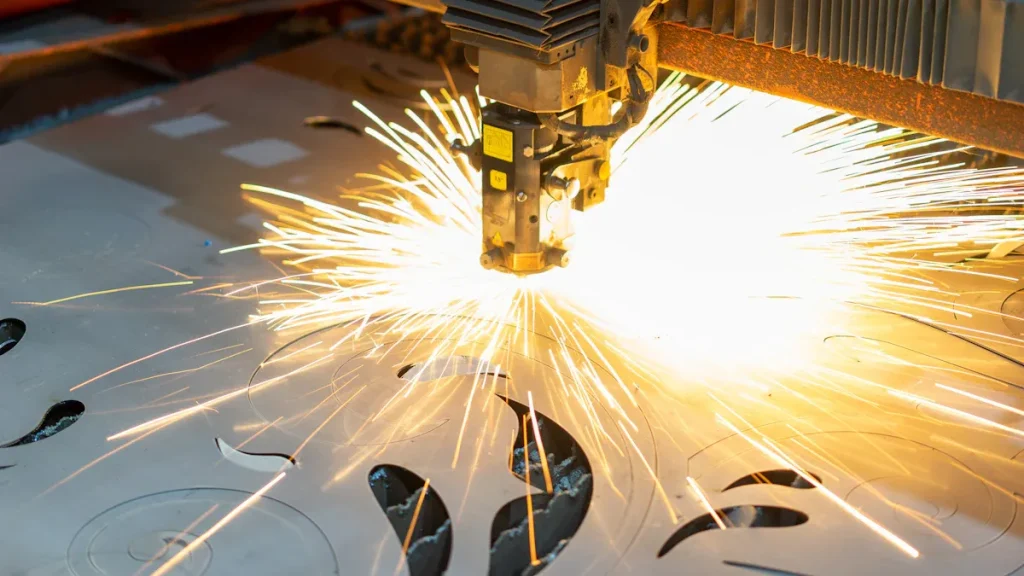
You start the laser cutting process by preparing your material. You check the type and thickness to make sure it matches your project. Next, you generate a laser beam using a special machine. This beam comes from stimulated emission, which creates a strong and focused light.
You focus the laser beam to a tiny spot. This step increases the energy and gives you high precision. You set up the cutting parameters, such as power and speed, based on your material. These settings help you avoid defects and get smooth edges.
Here is a simple breakdown of the laser cutting process:
- Material Preparation: You get your workpiece ready for cutting.
- Laser Beam Generation: You create a powerful laser beam.
- Beam Focusing: You focus the beam for maximum accuracy.
- Cutting Parameters Setup: You adjust power, speed, and focus.
- Cutting Process: You start the cutting operation using programmed instructions.
- Motion Control: You move the cutting head or table for exact cuts.
- Gas Assist (Optional): You use gas to clear away debris and improve efficiency.
- Collection and Finishing: You remove and finish the cut parts safely.
During cutting, the laser melts, burns, or vaporizes the material along the path you set. The process does not touch the material, so you keep the surface clean and avoid tool wear. You can cut metals, plastics, wood, and more with high precision.
Note: The laser cutting process works best for two-dimensional designs. You cannot use it for blind holes, slots, or 3D shapes. The laser moves in the X and Y directions only.
Techniques and Edge Quality
You can use different techniques to get the best results from laser cutting. The main goal is to achieve smooth edges and accurate shapes. You control the speed, power, and focus to match your material.
The quality of the cut edge depends on several factors. You can see how these factors affect your results in the table below:
| Factor | Effect on Cut Quality |
|---|---|
| Kerf Width | A smaller kerf width leads to a more precise cut edge. |
| Heat-Affected Zone (HAZ) | A narrow HAZ minimizes local embrittlement and maintains material integrity. |
| Cutting Speed | Higher speeds can produce a thinner HAZ, enhancing cut quality. |
You should know that thinner materials usually cut more smoothly. You need to optimize your laser settings to avoid defects. The nozzle and assist gas also play a big role in edge smoothness.
Here are some tips for better edge quality:
- Use the right speed for your material. If you go too fast, you may not cut deep enough. If you go too slow, you risk burning and charring the edges.
- Avoid narrow areas in your design. These spots can break or warp because of heat.
- Remember that the kerf width is about 0.007″ to 0.01″. Features smaller than this may not survive the cutting process.
- Watch out for discoloration in small geometries. Heat can cause color changes if it cannot escape quickly.
Laser cutting gives you high precision, but you must consider its limits. You cannot create beveled edges or deep engravings. The laser beam has a cone shape, which causes a slight taper in the cut. You may see a 1° to 2° angle on the edge. Post-processing can damage delicate parts, so handle them with care.
Tip: Always test your settings on a sample piece before starting your main project. This step helps you avoid mistakes and get the best results.
You can achieve excellent results with the laser cutting process if you understand these techniques and limitations. You get clean edges, detailed shapes, and reliable performance for many materials.
Types of Laser Cutter
When you pick a laser cutter, you should know the main types. Each type works best for certain materials and jobs. There are three main kinds: CO2 laser cutter, fiber laser cutter, and other types.
CO2 Laser Cutter
A CO2 laser cutter is used for many projects. This machine uses gases like carbon dioxide, nitrogen, and helium. The machine makes these gases excited to create a strong laser beam. You can use this cutter for wood, acrylic, glass, and some plastics. It works well for organic materials.
Here is a table that shows the power ranges and best materials for a CO2 laser cutter:
| Power Range | Materials Best Suited For |
|---|---|
| 40 watts | Organic materials, clear acrylic, glass |
| Higher | Thicker wood and acrylic |
You need to change the laser tube sometimes. This cutter uses more power than other types. It costs less at first, but you pay more for repairs and electricity. It does not cut as precisely as fiber laser cutters.
Fiber Laser Cutter
A fiber laser cutter is good for metal and detailed work. This cutter uses a solid fiber made from elements like erbium and ytterbium. The fiber sends the laser to the cutting head. It cuts metals quickly and absorbs energy well.
Fiber laser cutters use less power. You save money on electricity and repairs. The machine lasts a long time, up to 25,000 hours. You do not need assist gases for most jobs. It cuts with higher precision and gives better edges.
Here is a table to compare CO2 and fiber laser cutters:
| Feature | CO2 Laser Cutters | Fiber Laser Cutters |
|---|---|---|
| Laser Medium | Gas mixtures (CO2, nitrogen, helium) | Solid-state fiber (erbium, ytterbium) |
| Maintenance | Higher; tube replacement needed | Lower; longer lifespan |
| Power Consumption | More power needed | More efficient, lower costs |
| Cost | Lower initial, higher operational | Higher initial, lower operational |
| Cutting Precision | Lower | Higher |
Tip: Pick a fiber laser cutter for metal and high-precision jobs. You save energy and get better results.
Other Types
There are other laser cutter types for special jobs. Some machines use crystal lasers, like Nd:YAG or Nd:YVO4. These cutters are good for engraving and marking metals and plastics. They have special features, like very short pulses for fine details.
Some new laser cutters use advanced technology for special materials. You find these machines in research labs and high-tech factories. You can use them for micro-cutting, medical devices, and electronics.
Note: Always match your laser cutter to your material and project needs. Each type has different strengths for laser cutting.
Now you know the main types of laser cutter. You can choose the best machine for your project by looking at the material, cost, and precision.
Pros and Cons
Advantages
Laser cutting gives you many good things. It works fast and is very accurate. You can finish your work much quicker than with old methods. Laser cutting can be up to ten times faster. This helps you save time and make more products.
- The laser is very exact. You can cut parts that fit together well. The cuts can be as close as 0.1 mm. You do not need to fix or change the parts much.
- Laser cutting does not waste much material. It uses special software to put shapes close together. This saves you money on materials.
- You do not need to do a lot of extra work after cutting. The edges are smooth and do not have rough spots. You do not need to sand or clean them.
- You get the same results every time. The laser makes each part the same. This means you throw away less and do not have to redo work.
- You can plan your projects better. Fast work helps you finish jobs on time and keep your schedule.
Tip: Laser cutting can help you save money when you make many parts. You use less material and finish faster.
Disadvantages
You should know what is hard about laser cutting. There are some problems you need to think about.
- The machines cost a lot at first. Small businesses may not want to spend so much money.
- You need people who know how to use the machine. Training and skilled workers cost more.
- You have to take care of the machine often. You need to clean it, check it, and change parts to keep it working.
| Cost Type | Description |
|---|---|
| Routine Maintenance | You must clean and check the machine often. |
| Scheduled Downtime | Sometimes you stop the machine to fix or change parts. |
| Service Contracts | You may pay for help with repairs and checks. |
| Software Updates | You need to keep the software new, which can cost money. |
| Labor Costs | You pay for trained workers and their learning. |
| Electrical Infrastructure | You may need special wires and power for the machine. |
| Safety Systems | You need things like air cleaners and fire safety tools. |
| Environmental Compliance | You must follow rules for clean air and waste. |
| Consumables and Spare Parts | You need to buy new nozzles, lenses, and filters sometimes. |
- Laser cutting is not good for very thick materials. It works best for thin and medium pieces. For thick metal, you may need a different tool.
- Some materials make dangerous fumes when cut. You need safety tools to keep the air clean.
- Laser cutting uses more electricity than some other ways. This can make your bills higher.
Note: Always check if laser cutting is right for your job. It has many good points, but you should think about the costs and limits.
Materials, Safety, Applications
Suitable Materials
Laser cutting works on many materials. You can use it on metals like titanium, aluminum, and chromoly. It also works well with plastics, wood, and acrylic. The process makes smooth edges and exact shapes. Look at the table to see which materials are common and how thick they should be:
| Material | Minimum Thickness | Maximum Thickness |
|---|---|---|
| Titanium Grade 2 | 0.040″ (1.02mm) | 0.125″ (3.18mm) |
| Titanium Grade 5 | 0.040″ (1.02mm) | 0.250″ (6.35mm) |
| 4130 Chromoly | 0.050″ (1.27mm) | 0.250″ (6.35mm) |
| 5052 Aluminum | 0.040″ (1.02mm) | 0.100″ (2.54mm) |
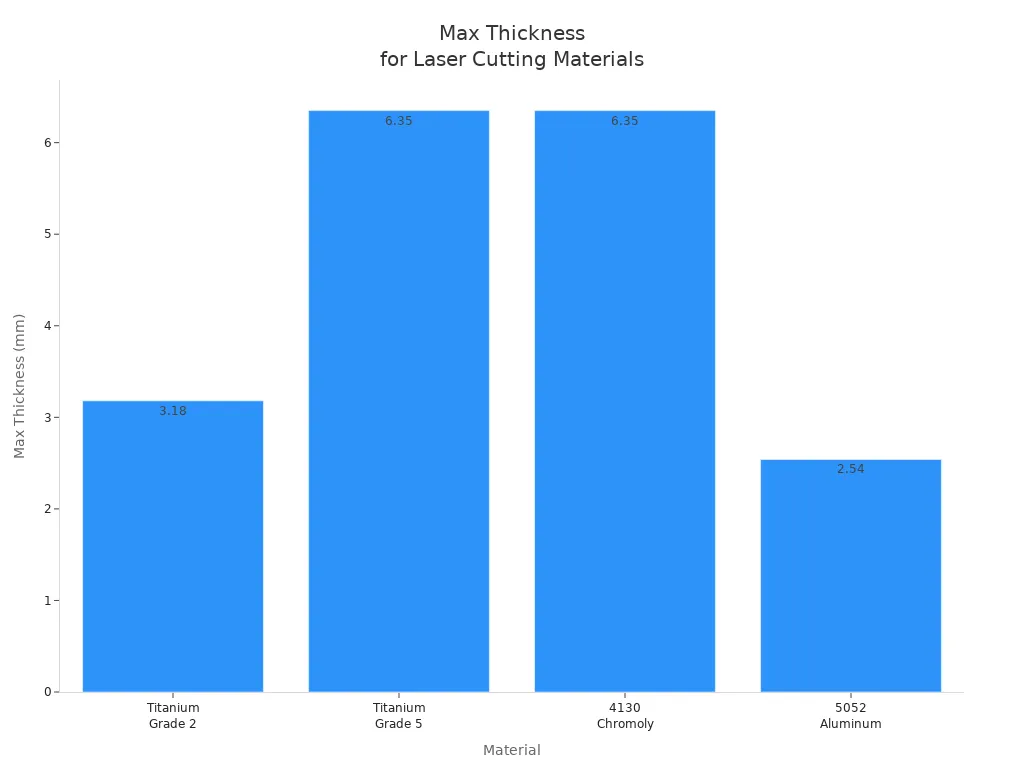
Always check the thickness before you start. This helps you avoid mistakes and get good results.
Unsuitable Materials
Some materials are not safe for laser cutting. You should not use these because they can be dangerous. Here are some materials you must avoid:
- ABS: Melts and burns, making toxic fumes.
- Epoxy: Makes harmful gases.
- Polypropylene: Melts and makes smoke.
- PVC: Releases chlorine gas.
- Fiberglass: Makes toxic gases.
- Polycarbonate: Thick pieces melt and change color.
- Coated carbon fiber: Hard to cut because of epoxy.
- HDPE: Melts and gets messy.
- Glued materials: Some glues make dangerous fumes.
- Leather with chromium (VI)
- Carbon fibers
- Polyvinyl butyrale (PVB)
- Teflon (PTFE)
- Beryllium oxide
- Materials with halogens
- Epoxy or phenolic resins
You should always check your material before you start cutting.
Safety Tips
You need to be careful when using laser cutting. Follow these tips to keep everyone safe:
| Safety Precaution | Description |
|---|---|
| Fire Extinguisher | Keep one close in case of fire. |
| Emergency Stop Button | Use it to turn off the machine fast. |
| First Aid Kit | Have supplies ready for burns. |
| Material Logbook | Write down what you cut to avoid errors. |
| Regular Cleaning | Clean dust to stop fires. |
| Material Safety Research | Check if materials can burn or make toxic fumes. |
| Supervision | Never leave the machine alone. |
| Non-Flammable Surface | Put the cutter on a safe surface. |
| Pulse Frequency Awareness | Know how settings can cause fires. |
Most accidents happen when people do not follow safety rules. Always pay attention and use the right safety gear.
Environmental Impact
Laser cutting can affect the environment. Fiber lasers use less energy than CO2 lasers. You can save up to 40% on energy with fiber lasers. These machines turn electricity into laser energy better. Fiber lasers are 50% efficient, but CO2 lasers are only 10% to 20%. Using fiber lasers makes less pollution.
Laser cutting also makes fumes and dust. You need good filters to keep the air clean. You can help by using recycled materials and special software to use less material. Good dust and fume removal keeps the air safe.
Common Applications
Laser cutting is used in many jobs. Here are some examples:
- Automotive: Cut car panels and engine parts.
- Electronics: Make circuit boards and engrave parts.
- Military: Make labels and parts for vehicles.
- Aerospace: Cut strong, light parts and test pieces.
- Manufacturing: Make medical tools and metal parts.
- Textiles: Cut fabric for clothes and designs.
- Construction: Shape building and design pieces.
- Signage: Make clear signs for stores.
- Shipbuilding: Cut parts for boats.
Laser cutting helps you make detailed shapes quickly and accurately. You can use it for many different things.
You use laser cutting when you want parts that are very exact. It helps you make the same part again and again. Laser cutting is fast and can do many jobs. But you need to think about what materials you use. You also need to be safe and know what your project needs. Look at the table below to see the main good and bad points:
| Key Benefit/Principle | Description |
|---|---|
| Precision | Makes parts that are very close to perfect. |
| Versatility | Works on many materials and for big or small jobs. |
| Limitation | Has trouble with thick or shiny materials. |
You can read guides from Atlas Manufacturing or Zintilon. These guides help you learn how to be safe and use laser cutting for more things.
FAQ
What materials can you cut with a laser cutter?
You can cut metals like steel, aluminum, and titanium. You can also cut wood, acrylic, and some plastics. Always check if your material is safe for laser cutting before you start.
Is laser cutting safe for beginners?
Laser cutting is safe if you follow the rules. Wear safety glasses. Never leave the machine alone. Keep a fire extinguisher nearby. Read the manual before you use the cutter.
How do you get the best edge quality?
Tip: Test your settings on a scrap piece first.
Use the right speed and power for your material. Clean the lens and nozzle. Adjust the focus for sharp edges.
Can you engrave with a laser cutter?
Yes, you can engrave designs on wood, acrylic, glass, and some metals. You set the laser to lower power. This marks the surface instead of cutting through.
What is the kerf in laser cutting?
The kerf is the width of the cut made by the laser. It is usually between 0.007″ and 0.01″. You should plan your designs with the kerf in mind for accurate parts.