


Pulse width, peak power, and pulse frequency shape the outcome of laser marking. These parameters control how a laser interacts with surfaces, directly affecting Marking Quality. Researchers found that pulse width can range from 10 picoseconds to 50 milliseconds, changing cutting quality and efficiency. Peak power may reach up to 4500 watts, which influences material removal rates. Pulse frequency adjustments between 400 kHz and 600 kHz show sensitivity in quality and efficiency. Understanding these differences helps optimize laser performance and ensures precise results.
Key Takeaways
- Pulse width affects marking quality. Shorter widths create cleaner marks, while longer widths may cause more heat and deeper impressions.
- Peak power is crucial for material removal. Higher power allows for faster marking, especially on metals, but must be adjusted based on material properties.
- Pulse frequency influences speed and detail. Higher frequencies enable quick marking with smooth results, while lower frequencies are better for deep engraving.
- Combining the right pulse width, peak power, and frequency optimizes marking outcomes. Experimenting with these settings leads to better results for different materials.
- Always test and adjust laser parameters based on the material type. This ensures clear, precise marks and prevents damage during the marking process.
Key Parameters in Marking Quality
Pulse Width Defined
- Pulse width is the time between the start and end of a single laser pulse.
- It controls how much energy the laser delivers in one burst.
- Shorter pulse widths can create cleaner and more precise marks, while longer pulse widths may lead to more heat and deeper marks.
| Pulse Width Range | Description |
|---|---|
| 2 ns | Minimum pulse width available |
| 500 ns | Maximum pulse width available |
| Adjustable | Users can select different widths |
Peak Power Explained
- Peak power is the highest amount of energy the laser releases during a pulse.
- High peak power is important for removing material quickly, especially in metals.
- The best peak power depends on the material’s properties, such as how well it conducts heat.
| Factor | Description |
|---|---|
| Peak Power | Higher power is preferred for efficient material removal or ablation. |
| Pulse Duration | Shorter pulse durations improve marking quality by promoting vaporization. |
| Material Properties | The right power and pulse duration depend on the material being marked. |
| Thermal Conductivity | High conductivity materials spread heat, affecting marking efficiency. |
| Heat Localization | Low conductivity materials keep heat in one spot, improving quality. |
Pulse Frequency Overview
- Pulse frequency is the number of laser pulses per second, measured in kilohertz (kHz).
- High pulse frequency allows for fast marking and smooth, detailed results.
- Lower pulse frequency is better for deep engraving, but it slows down the process.
- 20–30 kHz: High energy per pulse for deep engraving on metals.
- 40–60 kHz: Balanced output for logo marking on stainless steel.
- 70–100 kHz: Smoother, shallower marking for plastics and anodized aluminum.
Note: Pulse frequency controls energy distribution. High frequencies (80-120 kHz) allow rapid marking with sharp details, while low frequencies (1-20 kHz) are better for deep engraving on hard materials.
Parameter Interactions
The way pulse width, peak power, and pulse frequency work together shapes marking quality. For example, shorter pulse widths with higher peak power are best for precise ablation. Longer pulse widths need more power to mark the surface. Lowering pulse frequency increases the energy in each pulse, which helps with deep engraving or cutting. The right combination of these parameters leads to the best results for each material and application.
| Parameter | Effect on Marking Outcomes |
|---|---|
| Adjusting Frequency | Lowering frequency increases peak power and energy per pulse. |
| Adjusting Pulse Width | Increasing pulse width decreases peak power but keeps energy constant. |
| Higher Single-Pulse Energy | Improves material removal, ideal for cutting and rust removal. |
| Higher Peak Power | Allows for greater precision and less heat spread, good for fine engraving. |
| Combination for Engraving | Short pulse width + low frequency + medium-to-low power for sharp marks. |
| Combination for Material Removal | Long pulse width + low frequency + high power for faster removal. |
How Parameters Affect Marking Quality

Contrast & Visibility
Contrast and visibility are essential for identifying marks on different materials. Adjusting pulse width, peak power, and pulse frequency changes how the laser interacts with the surface. Shorter pulse widths deliver energy quickly, which helps create sharp, high-contrast marks. Higher peak power increases the temperature at the marking spot, making the mark more visible. Studies show that visible damage starts at about 53°C, and lesion size grows as peak temperature rises.
| Peak Temperature (°C) | Lesion Size Observed |
|---|---|
| Below 48 | No visible lesions |
| Above 48 | Increased lesion size |
- Lesion size increases with higher peak temperatures.
- Visible marks appear when the temperature reaches about 53°C.
- Open-loop control systems can cause larger variability in mark size.
Pulse frequency also affects visibility. High pulse frequency produces more pulses per second, which can make the mark smoother and more uniform. Lower pulse frequency delivers more energy per pulse, improving contrast for deep marks. In fiber laser marking, balancing these parameters ensures clear, readable marks.
Edge Sharpness
Edge sharpness defines how crisp and clean the borders of a mark appear. Pulse width and peak power play a major role in this area. Shorter pulse widths allow higher peak power, which removes material efficiently and creates clean edges. Longer pulse widths increase the heat-affected zone, which can blur the edges.
The precision of marking edges improves with short pulse widths and high peak power. This combination reduces thermal damage and produces sharp, well-defined marks. Pulse frequency also influences edge sharpness. At 100 kHz, marks show sharper features with higher roughness due to less overlap. At 600 kHz, the density of particles increases, and roughness decreases, but micro-cracks may form.
| Pulse Frequency | Edge Sharpness | Surface Roughness | Observations |
|---|---|---|---|
| 100 kHz | Sharper, more spaced-out features | Higher roughness due to less overlap | Distinct ablation features with pronounced peaks and valleys |
| 600 kHz | Increased density of particles | Reduced roughness with more uniform ablation | Cumulative thermal effects leading to micro-cracks in subsurface region |
Fiber laser marking systems often use high pulse frequency for smooth edges and low frequency for deeper, sharper marks. Adjusting these parameters helps achieve the desired edge quality.
Surface Finish
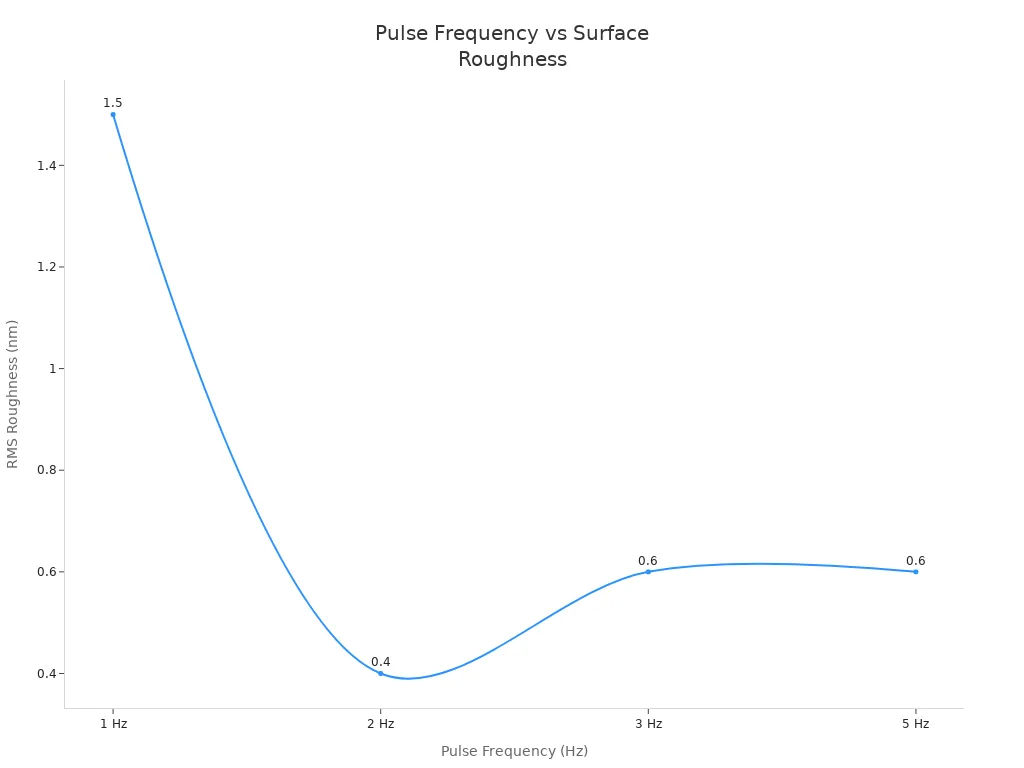
Surface finish describes how smooth or textured the marked area feels and looks. Pulse frequency is a key factor in controlling surface finish. Lower pulse frequencies can leave the surface rough because the laser spot does not overlap enough. Higher frequencies, especially between 30 kHz and 40 kHz, reduce slag and improve smoothness.
| Pulse Frequency (Hz) | RMS Roughness (nm) |
|---|---|
| 1 | 1.5 |
| 2 | 0.4 |
| 3 | 0.6 |
| 5 | 0.6 |
Nanosecond lasers with controlled pulse width and pulse energy help create thin oxide films. These films enhance surface finish without melting the material. Short pulse durations, less than 40 nanoseconds, allow precise energy input. This is important for sensitive materials and for achieving uniform color and finish in fiber laser marking.
- Nanosecond lasers control pulse energy and fluence, affecting oxide layer thickness and uniformity.
- Short pulse durations allow controlled energy input, preventing excessive thermal damage.
- Precise thermal control creates thin oxide films, improving surface finish.
Marking Depth
Marking depth measures how deep the laser mark penetrates the material. Pulse frequency and peak power are the main factors that influence depth. Lower pulse frequency increases energy per pulse, which helps create deeper marks. Multiple pulses at 50 kHz can make marks about 25 times deeper than single pulses. This happens because peak energy and heat transfer increase during continuous laser irradiation.
- Multi-pulse marking increases depth compared to single-pulse marking.
- Enhanced peak energy and heat transfer lead to deeper marks.
- Marking patterns with aspect ratios of 1 or less help measure depth accurately.
- Increasing the number of pulses affects the depth of injury per pulse.
Peak power is crucial for marking depth and quality. High power settings can cause excessive material ablation and surface damage, especially in heat-sensitive materials. Low power settings may result in unclear marks. Continuous-wave lasers provide steady power, while pulsed lasers deliver high peak power in short bursts. The average power of pulsed lasers is lower, but their high peak power can create deeper marks.
Fiber laser marking systems use these parameters to balance depth, throughput, and efficiency. Adjusting pulse width, peak power, and pulse frequency helps achieve the desired marking depth for each material.
Marking by Material
Metals
Metals require careful adjustment of laser parameters to achieve high marking quality. The energy intensity, speed, and frequency must match the metal’s properties. High laser power creates clear marks, while slower marking speeds allow for deeper engraving. Near-infrared lasers work best for metals because they match the absorption rate of most alloys. The focus should stay on the metal’s surface for the sharpest results.
| Parameter | Recommended Setting | Function |
|---|---|---|
| Laser Power | 60%-90% for metals | Determines energy intensity affecting depth and clarity of marking. |
| Marking Speed | 200-400 mm/s for deep engraving | Affects efficiency and quality; slower speeds allow for deeper marking. |
| Laser Frequency | 20-60 kHz for metals | Affects heat input and marking effect; higher frequencies improve accuracy. |
| Filling Method | Small pitch (0.01 – 0.05mm) | Determines uniformity and efficiency of marking. |
| Focal Length | Adjust based on laser lens specs | Affects clarity and energy density of the marking. |
Tip: Always adjust the power setting to avoid too much ablation or shallow marks. The right pulse frequency balances depth and surface finish.
Plastics
Plastics react differently to laser marking. Shorter pulse widths reduce the heat-affected zone, which prevents discoloration and keeps the mark even. Higher peak power increases contrast but can scorch the surface if set too high. The marking speed also matters. Slower speeds create deeper marks but may cause heat buildup. Faster speeds reduce thermal exposure but may not mark as deeply.
| Parameter | Effect on Mark Quality |
|---|---|
| Pulse Width | Shorter durations minimize heat-affected zones, while longer durations can cause discoloration and irregularities. |
| Peak Power | Higher power increases mark depth and contrast but risks scorching if too high. |
| Pulse Frequency | Higher frequencies improve mark uniformity but may reduce peak energy on harder plastics. |
| Marking Speed | Slower speeds allow deeper marks but risk heat buildup; faster speeds reduce thermal exposure but may yield shallower marks. |
Note: Choose the right wavelength for the plastic type to ensure the laser energy is absorbed well.
Other Materials
Materials like ceramics, glass, and composites need special attention during marking. Ceramics and glass often use CO2 or UV lasers for surface melting or micro-cracking. These materials can break easily, so precise control is important. Composites, such as carbon fiber or rubber, may react in different ways because they are not uniform. For organics like wood or leather, marking can create decorative effects, but some materials may char or release fumes.
| Material Type | Laser Marking Techniques | Key Considerations |
|---|---|---|
| Ceramics & Glass | CO2 or UV lasers for surface melting or micro-cracking. | Precise control needed to avoid breakage. |
| Composites | Suitable for carbon fiber, leather, and rubber. Produces readable marks. | Non-uniform materials may react inconsistently. |
| Organics | Commonly used for wood, leather, and rubber for decorative work. | Some materials may char or release fumes; ventilation is critical. |
Always check the material’s properties before marking. Adjust the laser settings to match the hardness and structure for the best results.
Optimization & Trade-Offs
Speed vs. Quality
Laser marking often involves balancing speed and quality. Modern handheld systems achieve high throughput by using advanced miniaturization and power efficiency. Adjusting pulse width, peak power, and pulse frequency can change the marking process. Shorter pulse widths minimize the heat-affected zone, improving precision and reducing unwanted surface effects. Longer pulse widths suit deeper engraving but may increase thermal damage. High repetition rates boost marking speed, yet they can lower pulse energy and reduce clarity. Careful pulse frequency optimization is necessary to maintain marking quality.
- Shorter pulse widths enhance precision and reduce heat effects.
- Longer pulse widths allow deeper marks but may cause more material removal.
- High pulse frequency increases speed but can decrease energy per pulse.
- High power laser engraving benefits from careful adjustments to avoid loss of quality.
Stability & Consistency
Consistent results depend on stable marking parameters. Laser power affects depth and speed. Too low power leads to unclear marks, while too high peak power causes excessive ablation. Marking speed influences how long the laser interacts with the material. Fast speeds may result in shallow marks, while slow speeds can cause too much material removal. Pulse frequency impacts depth and accuracy. High frequency improves accuracy for hard materials, and lower frequency prevents excessive ablation for soft materials. Focus position ensures the laser spot delivers energy precisely, improving clarity and accuracy. Fiber laser marking systems rely on stable settings for reliable results.
- Laser power and peak power control depth and clarity.
- Marking speed and pulse frequency affect throughput and accuracy.
- Proper focus position and wavelength selection improve surface quality.
- Stable parameters support consistent fiber laser marking.
Material-Specific Adjustments
Different materials require unique marking adjustments. Metals often need higher power density and shorter pulses for efficient marking. Non-metals benefit from lower power and longer pulses to prevent degradation. Fiber laser marking uses high-quality beam focus and optimized spot size for precise results. Adjusting scanning speed and overlapping percentage helps achieve uniform marks and minimal damage. Surface preparation, such as cleaning or applying coatings, enhances visibility. Environmental control ensures consistent performance. Material testing helps select the best marking parameters for each application.
| Adjustment Type | Recommendation |
|---|---|
| Wavelength selection | Choose based on material absorption; longer wavelengths suit metals. |
| Power and pulse duration | Higher power and shorter pulses for metals; lower power and longer pulses for non-metals. |
| Beam quality and focusing | Use high-quality beam focus and optimize spot size. |
| Scanning and overlapping | Adjust scanning speed and overlap for uniform marking. |
| Surface preparation | Clean surfaces; use coatings for better visibility. |
| Environmental considerations | Control ambient conditions for consistent marking. |
| Material testing | Test materials to select optimal laser parameters. |
Tip: Always test marking parameters before production to ensure optimal marking quality and efficiency.
Pulse width, peak power, and pulse frequency each play a key role in marking quality. Tuning these settings helps match the laser to different materials and marking goals. For best results, use short pulse width for high-precision marks and long pulse width for deep engraving. Choose constant power for uniform materials and pulsed power for heat-sensitive ones. High frequency creates smooth surfaces, while low frequency suits deep or rough marks. Experiment and monitor results to improve marking quality.
| Parameter | Description | Suitable Materials |
|---|---|---|
| Pulse Width | Short for precision; long for depth | High-precision, deep engraving |
| Power Mode | Constant for uniform; pulsed for heat-sensitive | Uniform, heat-sensitive |
| Laser Frequency | High for smooth; low for deep or rough | Metals, plastics, deep metal |
| Frequency Range | Metals: 20-60kHz; Non-metals: 10-30kHz | Metals, plastics |
FAQ
What is the role of laser power in marking quality?
Laser power controls how much energy reaches the material. High power density creates deeper marks and improves throughput. Low power settings help prevent surface damage. Adjusting power ensures clear marks and efficient laser marking applications.
How does pulse frequency affect surface finish?
Pulse frequency determines how many pulses hit the spot each second. High frequency produces smoother surfaces and increases efficiency. Low frequency creates rougher textures and allows deeper marks. Fiber laser marking systems use frequency adjustments for optimal surface quality.
Why is peak power important for fiber laser marking?
Peak power delivers intense energy in short bursts. This helps remove material quickly and creates sharp edges. Fiber laser marking relies on peak power for precision and high-quality marks. Adjusting peak power improves depth and reduces unwanted surface effects.
How can I optimize marking depth and spot size?
Use higher laser power and lower frequency for deeper marks. Adjust spot size to focus energy and increase power density. Fiber laser marking systems allow fine-tuning of pulse energy and spot position. Testing different settings improves depth and marking efficiency.
What factors influence pulse energy in laser marking applications?
Pulse energy depends on laser power, pulse width, and frequency. High pulse energy increases depth and marking speed. Low pulse energy improves surface quality and prevents damage. Fiber laser marking uses pulse energy adjustments for consistent results and better efficiency.