
You can make sure your fiber laser source works well by doing a few easy things. Taking care of your machine often helps it last longer and work better. Studies show you get better results when you do these things:
- Cleaning often stops damage and keeps your work the same every time.
- Checking the system finds problems early and helps it run well.
- Changing parts that wear out on time stops extra stress on your machine.
If you keep up with these habits, your machine will work well for you.
Key Takeaways
- It is very important to clean optics, nozzles, and filters often. Clean optics help make sharp cuts and keep your laser source safe.
- Take care of your cooling system by looking for leaks and cleaning filters. Good cooling stops the machine from getting too hot and helps it last longer.
- Check and oil moving parts on a regular schedule. This helps stop damage and keeps your fiber laser cutting machine working well.
- Calibrate your fiber laser source often. Calibration makes sure the laser beam is focused and lined up right, so you get better cuts.
- Use a routine maintenance checklist. Regular checks and updates help stop problems and keep your machine working its best.
Optical Component Maintenance
Importance of Clean Optics
You need to keep the optics in your fiber laser system clean to protect both the machine and your work. When dust, oil, or other contaminants build up on mirrors and lenses, the laser light cannot pass through as it should. This can cause heat to build up and may even lead to a problem called the fiber fuse effect. In this case, the contamination can fuse to the fiber core, creating dark spots that damage the fiber and lower the performance of your laser. Clean optics help you avoid these issues and keep your cuts sharp and accurate.
Tip: Clean optics also protect the fiber cladding and prevent damage to the laser and amplifiers.
Cleaning Mirrors, Lenses, and Bellows
You should regularly clean the mirrors, lenses, and bellows to keep your fiber laser source in top condition. Follow these steps for best results:
- Start with a regular inspection of each optical component. Use a fiberscope to check the fiber connector for dirt or smudges.
- If you see any contamination, use a dry cleaning technique first. Inspect again to see if the surface is clean.
- If the dirt remains, repeat the dry cleaning. If needed, use a wet cleaning method followed by a dry clean.
- Always inspect after each cleaning step until the surface looks spotless.
- Clean delivery optics every three months.
- Check laser beam alignment every week.
- After cleaning, always verify the alignment to ensure the laser works as expected.
You should clean in an enclosed area to keep out dust and debris. Wash your hands before handling connectors, and use high-quality wipes and swabs. Dispose of each wipe or swab after one use to avoid spreading dirt. Use only ultra-pure, residue-free cleaning fluid.
Many people make mistakes by skipping regular cleaning or not training operators well. If you regularly clean and inspect your optics, you can avoid most common problems and keep your laser running smoothly.
Cooling System Care
Why Cooling Matters for Fiber Lasers
It is important to keep your fiber laser cool. This protects the parts inside and keeps your work steady. Cooling stops the laser from getting too hot. If it gets too hot, it can hurt things like optical lenses and fibers. If you do not cool it, your machine may cut slower. It might lose accuracy or even stop working. When the laser overheats, you might have to pay more to fix or replace parts. Good cooling helps your laser last longer and keeps your work sharp.
Note: Cooling systems help stop sudden problems and save you money on repairs.
The table below shows what can happen if you do not take care of the cooling system:
| Consequence | Explanation |
|---|---|
| Reduced cutting efficiency | Overheating makes cutting worse and hurts quality. |
| Increased risk of equipment failure | Not caring for the system can break parts and cause delays. |
| Potential damage to laser components | Too much heat can ruin important parts and cost a lot to fix. |
| Higher operating costs | More breakdowns mean more money spent and late orders. |
Air and Water Cooling Maintenance
You need to check your cooling system often. This keeps your fiber laser working well. Air-cooled and water-cooled systems need different care. For air-cooled systems, you should change the coolant. You also need to clean fans and filters. These systems are best for short jobs or lasers that are not very strong. Water-cooled systems need you to check water tanks and pumps. If you use bad water, it can block the system and hurt your laser.
Here is a quick comparison:
| System Type | Maintenance Requirements | Efficiency of Cooling |
|---|---|---|
| Air-Cooled | Change coolant and clean parts often. | Not as good for strong lasers or long jobs. |
| Water-Cooled | Take care of tanks and pumps; use only clean water. | Cools better but needs more care. |
Check your cooling system every week. Look for leaks, strange sounds, or high temperatures. Clean filters and fans once a month. For water-cooled systems, change the water every three months. Always use clean, filtered water. If you see signs of overheating, stop the machine and fix the problem right away.
Tip: Taking care of your cooling system helps your laser work better and keeps it running longer.
Cutting Head & Nozzle Maintenance
Cleaning Nozzle and Filters
You need to keep the cutting head and nozzle clean to get the best results from your fiber laser machine. Dust, slag, and metal particles can build up inside the nozzle and filters. These particles block the laser beam and lower the quality of your cuts. You should clean the nozzle every day if you use the machine often. Use a soft brush or compressed air to remove loose debris. For stubborn build-up, use a cleaning solution made for laser nozzles. Always check the filters as well. Dirty filters can slow down the airflow and cause errors in cutting.
Tip: Clean the nozzle and filters in a well-lit area. This helps you see small particles that might affect your work.
You can set up a cleaning routine. Make a checklist for daily and weekly cleaning tasks. This helps you remember each step and keeps your machine in top shape.
Inspecting for Wear and Damage
You must inspect the nozzle and cutting head for signs of wear or damage. Damaged nozzles can cause poor cuts and machine errors. Look for these signs:
- Clogs that you cannot remove.
- Melted or cracked tips.
- Heavy slag build-up that will not come off.
- Heavy dross on your cuts.
- Wider cut paths than usual.
- Cuts that fail to pierce properly.
- Frequent machine errors during cutting.
If you see any of these problems, replace the nozzle right away. Using a damaged nozzle can waste material and slow down your work. You should also check the cutting head for loose parts or cracks. Replace any damaged parts to keep your machine safe.
Note: Regular maintenance of the cutting head and nozzle helps you avoid costly repairs and keeps your laser cutting machine running smoothly.
Gas Supply Check
Monitoring Gas Pressure
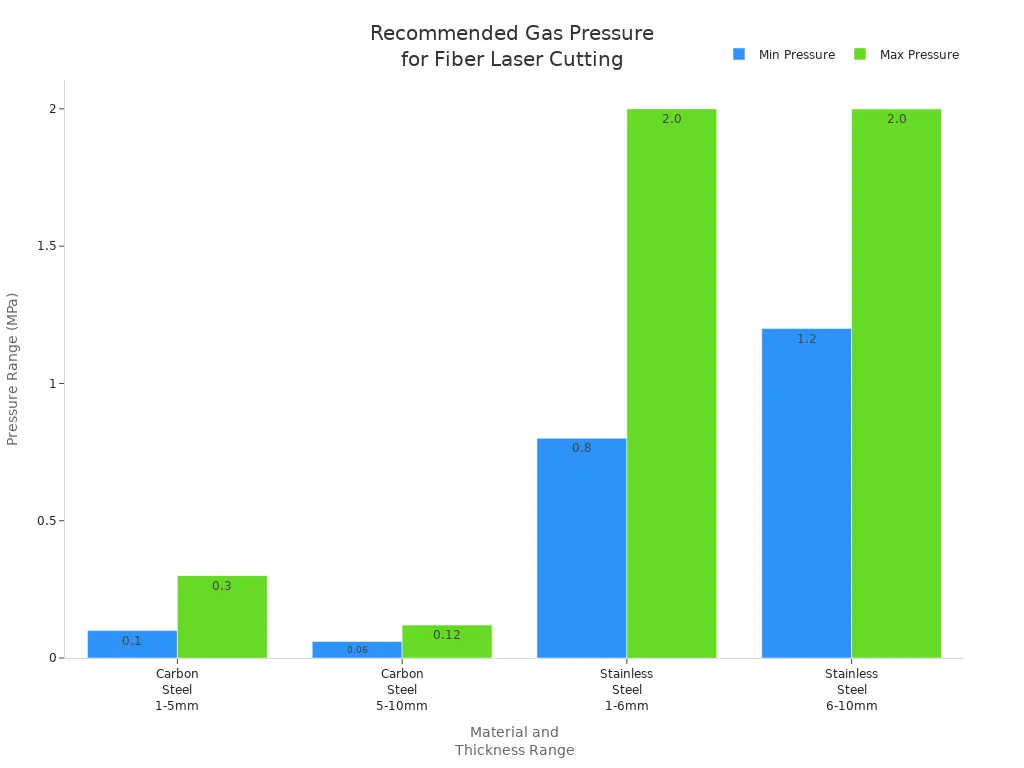
You need to check the gas pressure in your fiber laser system often. The right gas pressure helps you get clean, smooth cuts. If the pressure is too low or too high, you may see rough edges or extra material left on your parts. The type of material and its thickness decide the best pressure range. Use the table below to find the recommended gas pressure for common materials:
| Material | Thickness Range | Recommended Pressure Range (MPa) |
|---|---|---|
| Carbon Steel | 1 mm – 5 mm | 0.1 – 0.3 |
| 5 mm – 10 mm | 0.06 – 0.12 | |
| Stainless Steel | 1 mm – 6 mm | 0.8 – 2.0 |
| 6 mm – 10 mm | 1.2 – 2.0 |
You should always use the right assist gas, such as oxygen, nitrogen, or air. Adjust the gas pressure before you start cutting. If you do not keep the pressure in the right range, you may see these problems:
- Cuts look rough or have dross.
- Molten metal does not clear away.
- The machine cannot cut through the material.
Tip: Check the gas pressure gauge before every job. This simple step helps you avoid most cutting problems.
Replacing Gas Bottles
You must replace gas bottles when the pressure drops below the needed level. Low gas pressure can cause poor cuts and waste material. Always turn off the gas valve before you remove a bottle. Use both hands to handle the bottle safely. After you connect a new bottle, check for leaks by listening for hissing sounds or using a leak detector.
Follow these steps to replace a gas bottle:
- Turn off the gas supply and release any leftover pressure.
- Remove the empty bottle and set it aside.
- Attach the new bottle and tighten the connection.
- Open the valve slowly and check the pressure gauge.
- Test for leaks before you start the machine.
Note: Regular gas supply maintenance keeps your fiber laser cutting machine safe and helps you get the best results.
Beam Pathway Inspection
Alignment for Optimal Performance
You need to check the beam pathway alignment often. This helps your fiber laser work its best. If the beam is not lined up, your cuts may look bad. Your machine could even get damaged. Many things can make the beam go off track. Dirty optics, old parts, or big temperature changes can cause problems. The table below shows what can go wrong and how it affects your cuts:
| Cause of Misalignment | Effect on Cutting Accuracy |
|---|---|
| Misalignment of Optical Components | The laser beam moves off course, which lowers cutting power. |
| Contamination of Optics or Fiber | The beam weakens, and your cuts lose quality. |
| Wear and Tear of Fiber and Optical Components | The laser loses focus and intensity, making cuts less precise. |
| Temperature Fluctuations and Mechanical Stress | The beam shifts, and you get less efficient cutting. |
Check the beam pathway every week. Watch for uneven cuts or less power. If you see these signs, check the alignment right away. Good alignment gives you sharp and clean cuts. It also helps your laser run well.
Tip: Checking alignment often is an important maintenance step.
Clearing Obstructions
You need a clear beam pathway for good laser cutting. Dust, oil mist, or metal bits can block the optics. This can make your laser overheat or not work well. Follow these steps to clear away anything in the way:
- Turn off the machine and let the optics cool. Wear clean gloves.
- Use an air blower to blow off loose dust from the optics.
- Wet a lens tissue or swab with isopropyl alcohol (IPA). Do not put the liquid right on the optic.
- Wipe the optic gently in one direction. For round optics, wipe in a spiral from the center out. Throw away the tissue after each use.
Check the nozzle and protective lens for dirt or damage too. Clean or change them if you need to. Keeping the beam pathway clean stops energy loss and keeps your cuts neat.
Note: A clean and lined-up beam pathway helps your fiber laser last longer and work better.
Dust & Debris Management
Maintaining Dust Collector
You need to keep your workspace clean. This helps protect your fiber laser machine. Dust and debris can pile up quickly when you cut things. If you do not take care of dust collector systems, you can have problems. Your equipment and your health can be at risk. Dust can land on guide rails and cutting heads. This makes them move less smoothly. Dust can also cover protective lenses. This makes your cuts less accurate. If dust gets inside electronics, they may stop working. Clogged ventilation systems can make the machine get too hot.
| Impact on Equipment | Description |
|---|---|
| Guide rails | Dust affects movement accuracy. |
| Cutting heads | Debris may cause overheating. |
| Protective lenses | Dust reduces cutting quality. |
| Electronics | Dust can cause malfunctions. |
| Ventilation systems | Clogs reduce efficiency and cause overheating. |
To keep your machine working well, follow these steps: Wipe down surfaces and pick up debris every day. Use an industrial vacuum with a HEPA filter to collect dust safely. Put in high-efficiency dust collectors to pull dust from the cutting chamber. Check and clean airflow ducts often. Plan for professional maintenance to do deep cleaning.
Tip: Good air filters help you breathe better and keep your workspace safe.
Removing Scraps
You should always take away scraps and leftover debris from the cutting area. Big pieces of debris can block your equipment and slow you down. Small dust and debris can bother your eyes and skin. Breathing in tiny particles is also bad for your health. If you let debris build up, the air quality gets worse. Your shop can become unsafe.
- Use a brush or vacuum to clean up scraps after each job.
- Wear gloves and a mask to keep dust and debris off you.
- Look under the cutting table for hidden debris.
- Throw away all debris in a safe way.
Keeping your workspace clean helps your fiber laser machine last longer. You will also get better results with every cut. Make dust and debris cleaning a regular part of your routine.
Lubrication of Moving Parts
Reducing Wear in Fiber Laser Cutting Machines
You help your fiber laser cutting machine work well. Lubrication makes moving parts slide easily. Oil or grease stops parts from rubbing too much. This keeps them from wearing out fast. The motor stays safe, and the motion system moves without problems. If you follow the manual’s instructions, you stop extra wear. Your cuts stay sharp and accurate. Smooth movement helps your machine last longer and stay dependable.
Tip: Lubrication stops damage and keeps your machine working well.
Lubrication Schedule
You need a simple plan to keep moving parts in good shape. Each part needs cleaning and oiling at different times. Here is a guide:
| Component | Lubrication Interval | Action Required |
|---|---|---|
| Oil Filter | Every 1,000 hours | Clean well |
| Motion System | Weekly | Check oil pump, listen for noise |
| Z-Axis Guide Rail & Lead Screw | Every 500 hours | Lubricate with the right tools |
| Automatic Lubricant Pump | Every 14 days | Add oil to pump |
| Automatic Lubricant Pump | Every 6 months | Change oil |
| X, Y-Axis Guide Rails | As system configures | Lubricate as planned |
| X, Y-Axis Rack & Gear | Every 500 hours | Clean and lubricate |
| Metal Dust Cleaning | Daily | Remove dust from parts |
Clean metal dust from parts every day. Check the oil pump each week. Listen for strange noises that mean trouble. Lubricate the Z-axis guide rail and lead screw every 500 hours. Add oil to the pump every two weeks. Change the oil every six months. The X and Y-axis guide rails follow your system’s plan. Lubricate the rack and gear every 500 hours. If you stick to this plan, your machine will work well and last longer.
Note: A regular lubrication plan stops breakdowns and keeps your fiber laser cutting machine accurate.
Fiber Laser Source Calibration
Importance of Regular Calibration
You want your fiber laser source to work well every time. Regular calibration keeps your machine working right and makes it dependable. When you calibrate your fiber laser source, you make sure the laser beam goes where it should. This helps you get smooth cuts and sharp edges. If you skip calibration, your fiber lasers might lose focus or power. This can cause bad results and waste your materials. Calibration also helps you find small problems before they get worse. You protect your machine and keep it ready for any job. Good calibration is an important part of maintenance and helps your machine do its best.
Tip: Make calibration part of your regular maintenance routine to keep your machine working its best.
Calibration Steps
You can follow these steps to calibrate your fiber laser source and keep it working well:
- Pre-calibration Preparations
First, make sure the area is safe. Check your fiber laser source for any damage. Clean the optics so nothing blocks the laser beam. - Calibrating the Laser Beam Alignment
Use a beam alignment tool to check the laser’s path. Adjust the alignment until the beam goes straight and hits the right spot. - Focusing the Laser Beam
Learn how to focus your fiber laser source. Use a focusing tool to set the beam in the right place. Test the focus by making a sample cut and see how it looks. - Calibrating the Control Software
Open the control software for your fiber laser source. Set the marking or cutting settings. Use a material chart to pick the right numbers. Test and change the settings until you get the best results.
You should do these calibration steps often. This keeps your fiber lasers working well and gives you great results. If you see your cuts are not as good, check the calibration right away.
Note: Good calibration helps your fiber laser source last longer and saves you money on repairs.
Maintenance Recommendations & Professional Help
Routine Maintenance Checklist
You can keep your fiber laser cutting machines working well if you follow a simple checklist. This helps you stop problems before they start. It also keeps your cuts looking good. The table below shows what you should do and how often:
| Maintenance Task | Procedure | Frequency |
|---|---|---|
| Tighten Mechanical Components | Use a torque wrench to secure bolts and screws. | Weekly |
| Clean or Replace Air Filters | Remove, inspect, and clean or replace as needed. | Weekly |
| Examine and Replace Consumables | Check nozzles and ceramic rings for wear. Replace if needed. | Monthly |
| Inspect Protective Windows | Look for cracks or discoloration. Replace if damaged. | Monthly |
| Update Firmware and Software | Install updates from the manufacturer. | Monthly |
| Perform a Full Calibration | Recalibrate all axes and check laser beam alignment. | Quarterly |
| Test Laser Output | Measure output power and adjust settings. | Quarterly |
| Inspect the Entire System | Check all components for wear or damage. | Quarterly |
| Change Coolant | Drain and replace coolant. | Annually |
| Inspect and Replace Major Components | Replace parts showing significant wear. | Annually |
| Maintain Detailed Logs | Record all maintenance activities. | Ongoing |
Doing these steps helps your machine work better. You will get cleaner cuts and your machine will last longer.
When to Call a Technician
Sometimes, you need an expert to fix your fiber laser cutting machine. Watch for these warning signs:
- The laser power goes up and down.
- The system moves in a strange way.
- The cuts look bad.
- The machine does not cut in the right spot.
- You hear weird noises or feel shaking.
If you see any of these problems, stop using the machine. Call a trained technician right away. Find someone who is a Certified Fiber Optic Technician or Certified Fiber Optic Analyst. These people know how to fix hard problems. They help your machine work well and keep you from losing time or money.
Tip: If you take care of your machine and call for help when needed, your fiber laser cutting machine will work its best every day.
You keep your fiber laser source in top shape by following a clear maintenance plan. Remove dust from lenses, nozzles, and the workspace every day. Dust can block the beam and lower cut quality. Clean dust from the cooling system and dust collector often. Check for dust on the torch and filters. Dust on guide rails causes rough movement. Always inspect for dust before and after each job. Train your team to spot dust and clean it right away. Dust left on parts leads to breakdowns. If you see too much dust or damage, call a technician. Set a schedule to control dust and keep your machine running strong.
FAQ
How often should you clean the optics on your fiber laser?
Clean the optics every three months. If you use your machine every day, check them once a week. Clean optics give you sharp cuts and keep your laser source safe.
What signs show your cooling system needs maintenance?
Watch for leaks, odd sounds, or high heat. If you notice any of these, turn off your machine and look at the cooling system.
Tip: Checking often stops overheating and saves money on repairs.
Can you use tap water in a water-cooled fiber laser system?
No, only use clean, filtered water. Tap water can block the system and hurt your laser.
| Water Type | Recommended? |
|---|---|
| Tap Water | ❌ |
| Filtered Water | ✅ |
Why does your fiber laser need calibration?
Calibration helps your laser beam stay focused and correct. You get better cuts and do not waste materials.
Note: Calibrate your machine often to keep it working well.
What should you do if your laser cuts look rough?
Check the gas pressure, nozzle, and optics. Clean or change parts if needed.
- Look at the nozzle for damage
- Change the gas pressure
- Clean the optics